Your shopping cart is empty!


MENU
Your shopping cart is empty!
If you run a facebook page that is listed as a local business, company or organisation then your facebook page may be eligible for a verification badge. The badge is a grey tick that displays next to your business page name. Your facebook business page must have a profile picture and cover photo and be listed in one of the categories shows above to be eligible.
If your facebook page is eligible to be verified you will see the option in the settings section of your page. You can verify your facebook business page using a publicly listed phone number or using a business document like a phone bill.
The easiest way to get your page verified is to do so using your publicly listed business phone number. To do this please follow the steps below.
To verify your facebook business page please do the following:


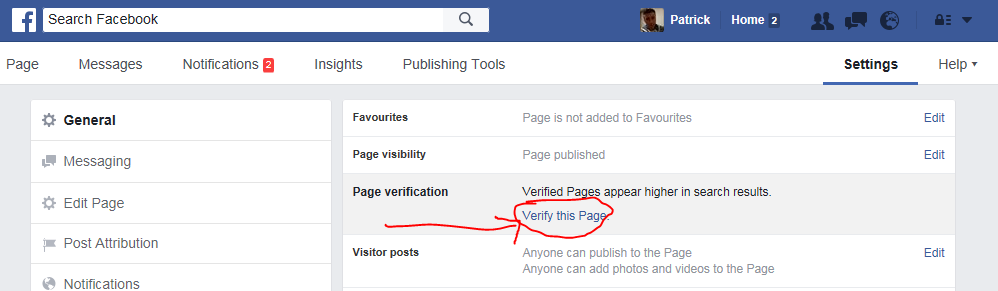


If you would like to verify your facebook page using a business document, simply follow the steps above but click on the verify this page with documents instead link as shown below.

Then upload your documents using the upload link and when you're done click on the send document button as shown below. The document should show your business name and address.
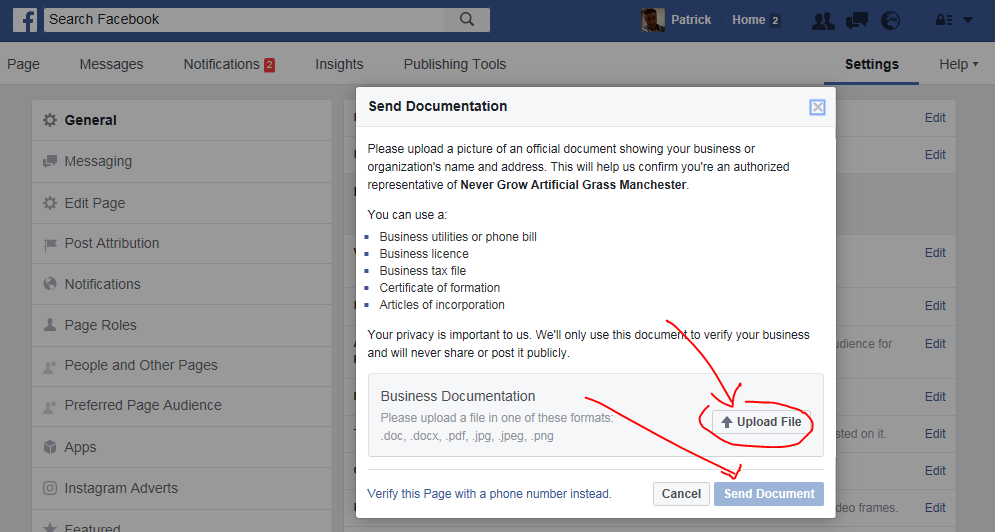
After facebook receives your verification code or business document, they will review your info to confirm that it matches public records and send you a notification or email about your verification status within a few days. If you verify by phone then in most causes the verification goes through right away. Please note you do not have to verify your business page, but it is worth doing as it shows the facebook verification badge next to your company name as well as showing your page higher up in facebook search results.
Leave a Comment